
HOW TO CHECKOUT WITH PAYPAL “AS A GUEST”
( This way you do not have to register a new Paypal account, – OR – ” Save your form of Payment ” )
To checkout as a guest from a PayPal payment request, you’ll need to click the “Pay with Debit or Credit Card” option within the PayPal checkout process. This allows you to enter your payment information directly without needing a PayPal account.
Here’s a general outline of the steps:
- Navigate to the payment request: You’ll receive a payment request from the sender, usually via email or a text messaged link.
- Initiate payment: Click the “Pay” button or similar action within the payment request.
- You will now be taken into the PayPal checkout interface.
- Look for a clickable button to “Pay with Debit or Credit Card” or a similar phrase.
- Enter payment details: Follow the instructions to enter your card information, billing address, and other required details.
- IMPORTANT!!! DO NOT CLICK THE BIG BUTTON AT THE BOTTOM YET!
- Just above where you would Submit the payment you will see a BOX that is already selected to “Create my Paypal account for Purchase protection on eligible purchases.” The LONG BUTTON at the bottom states; “Create Account & Pay Now“
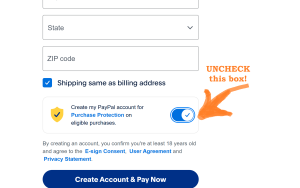
- UNCHECK THE BOX! – Now (see the picture below) the LONG BUTTON button has changed at the bottom to show that you will “Pay now as Guest.“
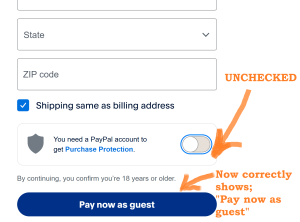
- Submit the payment with the LONG BUTTON at the bottom.
- Paypal notifies me IMMEDIATELY after the Payment goes through.
- I will let you know I received your Paypal Payment promptly!
850-361-8599
https://vinylsidingdoctor.com
CLICK to EMAIL –> [email protected]
CLICK HERE –> Helpful Forums for WordPress users of ElementorI
